CAQH is an important part of provider credentialing in the United States. It gives participating health plans access to provider information when the provider has completed the required steps and authorized access.
However, completing a CAQH profile does not mean the credentialing process is automatically complete. Health plans may still need to verify information, review documents, and complete their own credentialing requirements.
This is why accuracy matters.
Simple CAQH mistakes can lead to additional questions, document requests, corrections, or follow-up. These issues can contribute to credentialing delays, especially when a payer cannot verify the information it needs.
The good news is that many CAQH errors are preventable.
This guide covers 10 common mistakes providers and credentialing teams should watch for. It also explains how to avoid them and keep the credentialing process moving.
2026 note: This article is based on CAQH’s current Provider Data Portal guidance, including the Provider User Guide v46.0, updated June 15, 2026. CAQH requirements can change, so providers should always follow the instructions shown in their current portal and any additional requirements from the health plan or organization requesting credentialing.
Why Do CAQH Mistakes Cause Credentialing Delays?
Credentialing depends on accurate and verifiable provider information.
A payer may review information about a provider’s education, training, licenses, employment history, practice locations, hospital affiliations, and professional liability insurance. If the information is incomplete or does not match the supporting documentation, the payer may need additional information before continuing its review.
CAQH’s current guidance includes a review process that identifies required fixes and supporting documents needing attention before attestation. Providers can use the View Errors function to correct issues identified in the profile.
For example, an expired state license or professional liability insurance policy can prevent a provider from completing re-attestation until the relevant information is updated.
This means a small issue in CAQH can become part of a larger credentialing problem.
Understanding common CAQH errors can help providers and credentialing teams identify issues before they lead to unnecessary credentialing delays.
1. Entering Outdated Provider Information
One of the most common CAQH mistakes is failing to update information after something changes.
Providers may change employers, practice locations, contact information, specialties, or other professional details. If the CAQH profile still contains the old information, an authorized organization may be working with outdated data.
This can create questions during credentialing.
For example, a payer may contact a practice using an old address or find that the provider’s current employment information does not match the information in CAQH.
The problem may be simple, but resolving it can require additional communication.
How to Avoid It
Review your complete CAQH profile whenever your professional information changes.
Do not update only the section you think is relevant. A change in employment, for example, may also require you to review your practice locations and other related information.
Before attestation, compare your CAQH profile with your current CV and professional records.
This simple review can prevent many avoidable CAQH errors.
2. Entering the Wrong NPI
Another common issue involves the National Provider Identifier.
Individual providers generally use an individual, or Type 1, NPI. Organizational providers use a Type 2 NPI.
Entering the wrong NPI or providing information that does not align with the NPI record can create validation issues.
The NPI should also be consistent with the provider’s professional information.
A mismatch may require correction before the profile can be used effectively during credentialing.
How to Avoid It
Verify the NPI before entering it into CAQH.
Check the information associated with the NPI against the provider’s current records.
Do not copy an organization NPI into an individual provider field.
If CAQH identifies an NPI-related issue, resolve it before completing attestation.
Taking a few minutes to verify this information can help prevent unnecessary credentialing delays later.
3. Entering Incorrect or Expired License Information
Licenses are a critical part of provider credentialing.
Providers may hold licenses in multiple states, and each applicable license needs to be accurately reflected in their professional records.
Common CAQH mistakes include entering an incorrect license number, using an old expiration date, or failing to update a recently renewed license.
These errors can become particularly important during re-attestation.
CAQH’s current 2026 guidance states that if a state license or professional liability insurance has expired, the provider may be required to update the expiration date and other relevant information before being able to attest.
How to Avoid It
Check each current license against the official state record.
Verify the license number, state, status, and expiration date.
If a license has been renewed, update the profile and supporting documentation where required.
Do not rely on information from an older credentialing application.
Keeping licenses current is one of the easiest ways to reduce CAQH errors.
4. Leaving Employment History Incomplete
Employment history can take time to prepare, particularly for providers with long professional careers.
CAQH’s provider guidance includes relevant employment history for the previous 10 years. However, some organizations may require a longer work history or additional information about gaps.
An incomplete employment history can create questions during credentialing.
For example, a payer may notice a gap that is not explained or may request additional information about a previous employer.
This can add another step to the review process.
How to Avoid It
Use your current CV, previous applications, and employment records to reconstruct your professional history.
Check employer names and employment dates carefully.
Pay particular attention to gaps.
Do not change dates simply to make your work history appear continuous. If an organization requires an explanation for a gap, provide an accurate explanation based on your records.
Preparing employment history in advance can prevent avoidable credentialing delays.
5. Uploading Documents That Do Not Match Your Profile
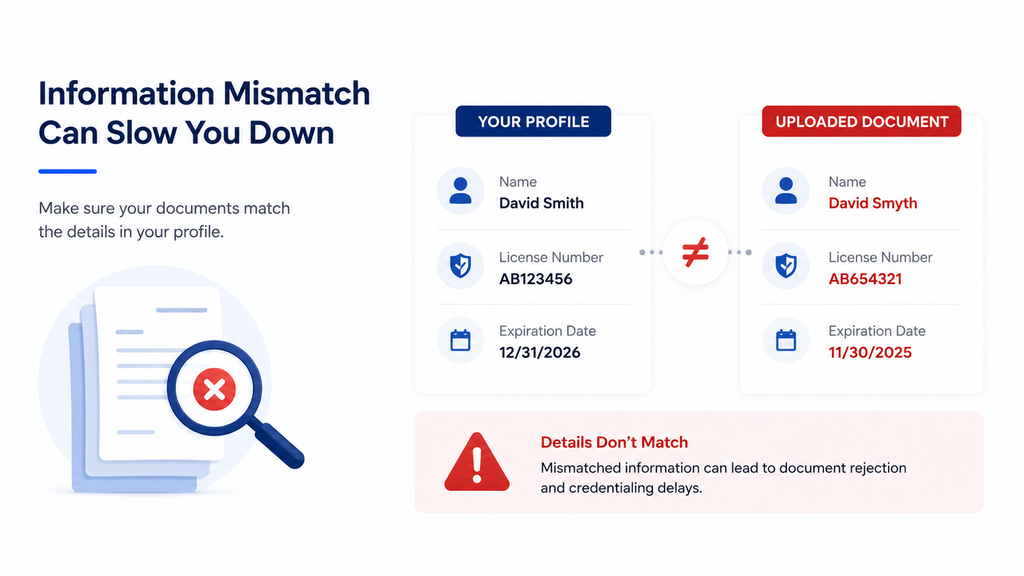
One of the more important CAQH mistakes is submitting a document that does not match the information entered in the profile.
This can happen with professional liability insurance, licenses, certifications, and other credentials.
For example, the policy number entered in CAQH may be different from the number shown on the uploaded insurance document.
CAQH’s provider guidance specifically addresses supporting documentation and requires providers to correct issues identified during review.
When profile information and documentation do not align, additional review may be necessary.
How to Avoid It
Compare every important number and date before uploading a document.
Check the provider name, policy number, license number, effective date, and expiration date where applicable.
Use the current version of each document.
Do not assume that a document is acceptable simply because it was used for a previous credentialing application.
6. Uploading Expired or Unreadable Documents
Having a document in the CAQH profile does not necessarily mean the document requirement has been satisfied.
A document may be expired, incomplete, or otherwise require attention.
CAQH’s current Provider Data Portal provides a review process that can identify supporting documents requiring attention.
Expired professional liability insurance and state licenses are especially important because CAQH may require providers to update them before attestation.
Unreadable documents can also create unnecessary follow-up.
If a payer cannot verify the information from a document, the credentialing team may need to request another copy.
How to Avoid It
Before uploading a document, check its expiration date.
Make sure every page is readable and that important information is visible.
After uploading, review the document status in your CAQH account.
If CAQH identifies a problem, address it promptly.
This can help prevent credentialing delays caused by avoidable document issues.
7. Forgetting Authorization and Release Requirements
Another common problem is completing the profile but overlooking authorization or release requirements.
CAQH’s Provider Data Portal includes an Authorize section, along with profile and document management functions.
The current CAQH guide also states that the initial profile and attestation process requires a signed release form. State-specific requirements can affect which forms are displayed.
A provider may therefore have completed most of the profile but still have an outstanding requirement.
How to Avoid It
After completing your profile, review the Documents and Authorize sections.
Check whether the required release or authorization information has been completed.
Follow the instructions displayed in your current CAQH account.
Do not assume that completing the profile fields automatically completes every requirement.
8. Not Giving the Payer Appropriate Access
Completing a CAQH profile does not automatically mean that every health plan can access it.
Providers need to manage authorization according to the applicable CAQH and payer requirements.
If a health plan cannot access the information it needs, the provider may receive another request for action.
This can add unnecessary steps to the credentialing process.
For example, a payer may be ready to review the provider’s information but find that the required authorization has not been completed.
How to Avoid It
Review your CAQH authorization settings before starting payer credentialing.
If a health plan gives you specific instructions about CAQH access, follow them carefully.
After making changes, confirm that the profile is accessible as required.
This can help reduce unnecessary communication and potential credentialing delays.
9. Attesting Without Reviewing the Profile
Attestation is not simply a final submission button.
Before attesting, providers should review their information and address required corrections.
CAQH’s current guide explains that the Review page identifies required fixes or supporting documents needing attention. Providers can select View Errors and correct the relevant information before completing the process.
Ignoring these warnings is one of the most avoidable CAQH errors.
A provider may believe the profile is complete because all major sections have been filled out. However, the system may still identify information that needs correction.
How to Avoid It
Use the Review & Attest function before completing attestation.
Check every required error.
Then review the profile as a whole.
Pay attention to names, dates, licenses, employment history, practice locations, insurance information, and supporting documents.
A final review can catch CAQH mistakes before they reach the payer.
10. Missing the CAQH Re-Attestation Deadline
CAQH is not a one-time task.
Most providers must re-attest every 120 days. Illinois providers have a 180-day re-attestation period under CAQH’s current guidance.
This recurring requirement is easy to overlook when there are many other credentialing deadlines to manage.
A profile can become outdated if the provider does not review and re-attest on time.
CAQH’s current guide also explains that providers should update profile information and supporting documentation before completing re-attestation.
How to Avoid It
Track your next re-attestation date.
Do not wait until the deadline is close.
Before re-attesting, review the profile for changes and check whether any supporting documents need to be updated.
This turns CAQH maintenance into a regular process rather than a last-minute task.
How CAQH Mistakes Can Affect Insurance Credentialing
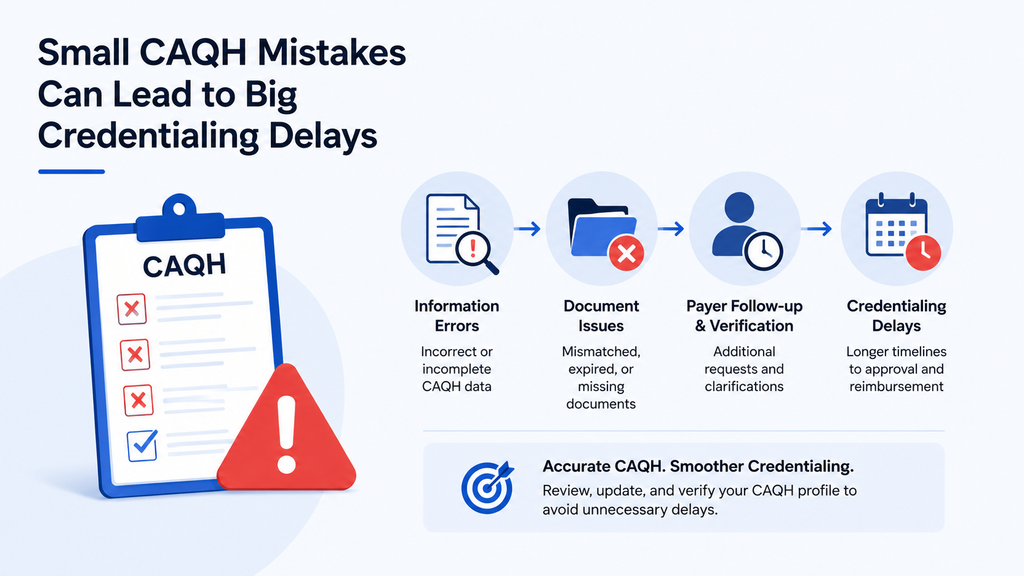
Not every CAQH issue will automatically delay credentialing.
However, errors can create additional work.
A payer may need to request clarification, wait for a corrected document, or ask the provider to update information before continuing its review.
Consider a provider whose malpractice insurance information is outdated.
The payer may identify the discrepancy and request a current document. The provider then needs to locate the document, update CAQH, and respond to the payer.
Each step takes time.
The same can happen with licenses, employment history, practice locations, or authorization.
When several issues occur at the same time, the administrative burden can increase further.
This is why preventing CAQH errors is an important part of maintaining an efficient credentialing process.
How to Prevent CAQH Errors Before Submission
A structured review can help prevent many common issues.
Start with your professional records.
Compare your CAQH profile with your current CV, licenses, insurance documents, and other applicable credentials.
Check dates carefully.
Then review your practice locations and employment history.
Next, review the Documents section.
Make sure documents are current and that the information on each document matches the corresponding profile field.
Finally, use the CAQH review and attestation process to identify required fixes.
This approach can help catch CAQH mistakes before they become payer follow-up items.
A Simple CAQH Error-Prevention Checklist
Before submitting or re-attesting, check the following:
- Verify your NPI and provider information.
- Review all current licenses and expiration dates.
- Check your employment history and gaps.
- Confirm current practice locations.
- Review hospital affiliations, where applicable.
- Match supporting documents with profile information.
- Check professional liability insurance details.
- Review authorization settings.
- Correct all required CAQH errors.
- Confirm your next re-attestation date.
This final review does not guarantee faster credentialing because each health plan has its own processes and requirements.
However, it can help reduce avoidable issues within the provider’s CAQH profile.
How MantraComply Can Help With CAQH Management
Managing CAQH becomes more challenging when an organization has multiple providers.
Each provider may have different licenses, insurance policies, practice locations, documents, payer applications, and re-attestation dates. Tracking all of this manually can become time-consuming.
MantraComply offers CAQH profile management as part of its broader credentialing and enrollment platform. Its published services include CAQH profile creation and maintenance, application management, document preparation, submission tracking, and re-credentialing support.
The platform also includes CAQH management, recredentialing tracking, expiration tracking, provider portals, and team access.
For credentialing teams, this can provide a more centralized way to manage provider information and related tasks.
MantraComply also offers application preparation, submission, and tracking across payers, along with commercial and government payer enrollment services.
The platform does not replace CAQH or the requirements of individual health plans.
Instead, it can help organizations manage the administrative work around CAQH and the broader credentialing workflow.
For organizations managing multiple providers, this can make it easier to monitor documents, applications, expiration dates, and recredentialing requirements from a more centralized system.
Final Thoughts
CAQH can make provider information easier to maintain and share with participating healthcare organizations. But the value of the profile depends on the accuracy and currency of the information it contains.
The most common CAQH mistakes are often simple.
A provider may enter an outdated license date, forget to update an employment record, upload a mismatched document, or miss a re-attestation deadline. Each issue can create additional work for the provider and the payer.
These CAQH errors do not automatically mean that credentialing will be delayed. However, they can create additional verification and follow-up steps that contribute to credentialing delays.
The best approach is proactive.
Review your CAQH profile regularly. Keep licenses and insurance information current. Make sure supporting documents match your profile. Check your authorization settings and complete re-attestation within the required timeframe.
For organizations managing multiple providers, this ongoing work can be difficult to manage manually. MantraComply can support CAQH management, credentialing, recredentialing, document tracking, and payer enrollment through its centralized platform.
Ultimately, avoiding CAQH mistakes is not about completing the profile as quickly as possible.
It is about maintaining accurate, complete, and current information throughout the provider credentialing lifecycle.
Frequently Asked Questions
Common CAQH mistakes include outdated provider information, incorrect NPI or license information, incomplete employment history, mismatched documents, expired credentials, missed authorization requirements, and missed re-attestation deadlines.
Yes. Incomplete or inconsistent information may require additional corrections, documentation, or payer follow-up, which can contribute to credentialing delays.
Most providers must re-attest every 120 days, while Illinois providers have 180 days.
CAQH may identify required supporting documents or profile fixes during the review process. Expired state licenses or professional liability insurance can also require updates before re-attestation.
No. CAQH is part of the credentialing workflow. Individual health plans and organizations can have their own credentialing, contracting, and enrollment requirements.