What separates a provider who joins the HealthPartners network smoothly from one whose application remains pending longer? Understanding the HealthPartners provider credentialing process before applying can help practices prepare more effectively. Credentialing involves verifying provider qualifications, submitting required information and documentation, and meeting applicable network participation requirements. Accurate provider details, licenses, NPI information, malpractice documentation, and practice locations are important throughout the process. Missing or inconsistent information may lead to follow-up requests and additional processing time. This guide explains HealthPartners provider credentialing, eligibility, required documents, credentialing vs. enrollment, the step-by-step process, common delays, and how credentialing services can support healthcare practices.
What Is HealthPartners Provider Credentialing?
HealthPartners provider credentialing is the formal process used to ensure that network practitioners are qualified to treat HealthPartners members. It is separate from contracting, which is the formal process of obtaining a provider network agreement. Both are part of the overall process of joining the HealthPartners network.
Before credentialing can begin, a provider must already be contracted or have been offered a contract by HealthPartners. This means practices should not begin the credentialing application while their contracting request is still pending.
Depending on the provider type and credentialing pathway, HealthPartners may review information such as:
- Professional licensure
- NPI
- Specialty
- Education and training
- Malpractice coverage
- Professional and practice information
- Other documentation required for the applicable credentialing process
HealthPartners also has a separate facility credentialing process. Facilities subject to this process must complete the Uniform Facility Credentialing Application and provide the necessary supporting documentation.
Credentialing is therefore more than completing a form. It is a verification process designed to establish that applicable practitioners meet HealthPartners’ credentialing criteria.
HealthPartners Provider Credentialing vs. HealthPartners Provider Enrollment
HealthPartners provider credentialing and HealthPartners provider enrollment are closely related, but they are not identical.
Credentialing focuses on verifying the qualifications of practitioner types that HealthPartners credentials. Enrollment applies to practitioners who need to be established within HealthPartners’ provider data systems, including certain practitioner types that are not credentialed.
| HealthPartners Provider Credentialing | HealthPartners Provider Enrollment |
|---|---|
| Verifies applicable practitioner qualifications | Establishes applicable practitioners in provider data |
| Applies to practitioner types HealthPartners credentials | Applies to credentialed and certain non-credentialed practitioner types |
| Requires the applicable credentialing application | Requires applicable provider information |
| Includes credential verification and review | Includes provider data and participation information |
| Must be completed before applicable practitioners can participate | Supports provider participation and ongoing data management |
HealthPartners maintains separate lists of credentialed and non-credentialed practitioner types. For example, some practitioners are not credentialed by HealthPartners but may still need to be enrolled.
Practitioners, except interpreters, must submit an NPI and license to be enrolled with HealthPartners.
Understanding this distinction is important because a practice should first determine whether a provider needs credentialing, enrollment, or both before beginning the applicable workflow.
Who Is Eligible for HealthPartners Provider Credentialing?
Eligibility for HealthPartners network participation can depend on provider type, specialty, geographic location, and network needs.
HealthPartners currently provides contracting pathways for medical, behavioral health, chiropractic, and other provider categories in Minnesota, Iowa, North Dakota, South Dakota, and Wisconsin. Providers outside the applicable service area may be directed to HealthPartners’ national network partner.
HealthPartners also maintains a list of practitioner types that it credentials and a separate list of practitioner types that are not credentialed but may require enrollment.
Before beginning the process, providers should generally confirm:
- Whether HealthPartners contracts with their provider type
- Whether the applicable specialty or geographic area is open
- Whether contracting is required first
- Whether the practitioner requires credentialing or enrollment
- Which application applies
- Which supporting documents must be submitted
Network availability can also matter. HealthPartners notes that certain specialties or regions may be considered sufficiently covered according to access and availability standards.
Providers should therefore confirm the applicable participation pathway before spending significant time preparing an application.
Basic Requirements for HealthPartners Provider Credentialing
Before starting the HealthPartners credentialing process, providers should be prepared to provide accurate professional and administrative information.
Depending on the provider type, this may include:
- Current professional license
- NPI
- Practitioner specialty
- Completed credentialing application
- Malpractice coverage documentation
- Education and training information
- Practice and location information
- Additional forms requested by HealthPartners
HealthPartners’ current online credentialing application collects practitioner information including name, date of birth, NPI, specialty, credentialing type, and the organization to which the provider is applying.
For certain hospital credentialing and privileging applications, additional materials can include a health history form, hospital attestation, secondary interests disclosure, delineation of privileges, staff category forms, and applicable background forms.
Meeting the basic requirements does not necessarily mean a provider is immediately active in the network. Contracting, credentialing, enrollment, and final administrative steps may all need to be completed.
Documents Required for a HealthPartners Provider Application
Preparing documentation before beginning the application can reduce unnecessary administrative delays
| Document | Purpose |
|---|---|
| CAQH Profile | Provides standardized provider information for credentialing and verification. |
| Professional License | Confirms the provider is legally authorized to practice in the applicable state. |
| NPI Information | Identifies the individual provider or organization for healthcare transactions. |
| Malpractice Insurance | Verifies that the provider maintains the required professional liability coverage. |
| Certificate of Insurance | Provides evidence of current insurance coverage, when required. |
| Education and Training Records | Verifies the provider’s educational background, residency, fellowship, or other applicable training. |
| Board Certification | Confirms specialty certification when applicable to the provider. |
| Work History / CV | Documents the provider’s professional experience and employment history. |
| DEA Registration | May be required for providers who prescribe controlled substances. |
| Practice Information | Confirms the provider’s current practice location, specialty, contact information, and other demographic details. |
The exact documentation depends on the provider and application type, so practices should use the current HealthPartners requirements rather than relying on an old checklist.
Step-by-Step HealthPartners Credentialing and Enrollment Process
The HealthPartners provider credentialing process follows a defined sequence. Understanding each stage can help practices avoid submitting information prematurely or overlooking an important administrative step.
Step 1: Confirm Network Participation
Before starting credentialing, determine whether the provider or organization can join the applicable HealthPartners network.
HealthPartners may consider whether particular specialties or regions already have adequate provider access. Some areas can therefore have different participation requirements.
Step 2: Request a Contract
For new providers, contracting is the first step.
Providers or organizations seeking to join the network must complete the applicable Join Our Network application. HealthPartners states that providers must be contracted or have been offered a contract before credentialing begins.
In certain geographic areas, medical and behavioral health providers may also need to enroll with the Minnesota Department of Human Services before applying to join the network.
Step 3: Receive a Contract or Contract Offer
After the contracting request is reviewed, HealthPartners may offer a provider agreement.
Only after a contract has been offered—or when an organization is already contracted—should the provider move into the credentialing and enrollment stage.
Step 4: Complete the Provider Application
Once the contracting requirement is satisfied, the practitioner or practice completes the applicable credentialing or enrollment application.
For initial medical credentialing, all Minnesota-based medical clinics are required to use ApplySmart. Clinics in other states may also use ApplySmart. HealthPartners provides additional submission options for applicable providers.
Dental providers have a separate initial credentialing application.
Step 5: Submit Supporting Documents
The completed application must be accompanied by the required supporting documentation.
For medical and dental health plan credentialing, this includes the applicable credentialing application and malpractice face sheet. Hospital credentialing can require additional documents depending on the organization and privileges being requested.
Before submission, practices should review the entire application for:
- Missing fields
- Incorrect NPI information
- Expired licenses
- Inconsistent practice information
- Missing supporting documents
- Incorrect specialty information
Step 6: Credentialing Review
HealthPartners reviews the submitted credentialing information against its applicable credentialing criteria.
The processing time can vary based on the completeness of the application, whether additional information is required from the practitioner, and whether the practitioner meets HealthPartners’ credentialing criteria.
If discrepancies or missing information are identified, the practitioner may need to provide clarification or corrected information.
Step 7: Provide Additional Business Information
After contracting and credentialing activities are underway, HealthPartners may request additional practice information.
Current requirements can include:
- W-9
- Disclosure of ownership
- Provider information documentation
- Medical location information
- Dental office questionnaire
- Universal Consultant Confidentiality Agreement
Responding promptly to these requests can help keep the overall onboarding process moving.
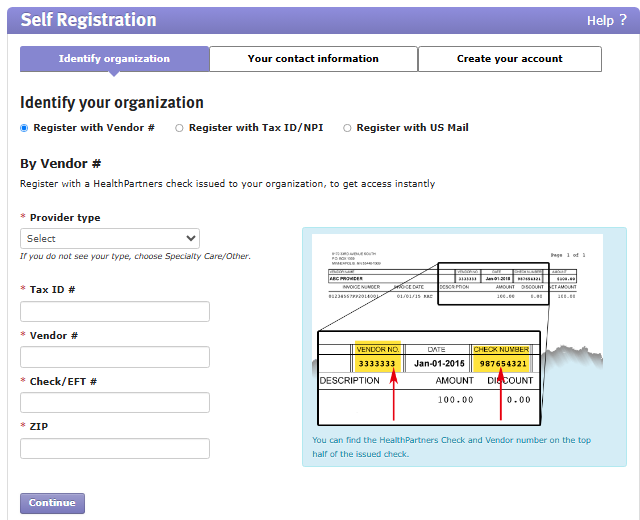
Step 8: Create the Provider Portal Account
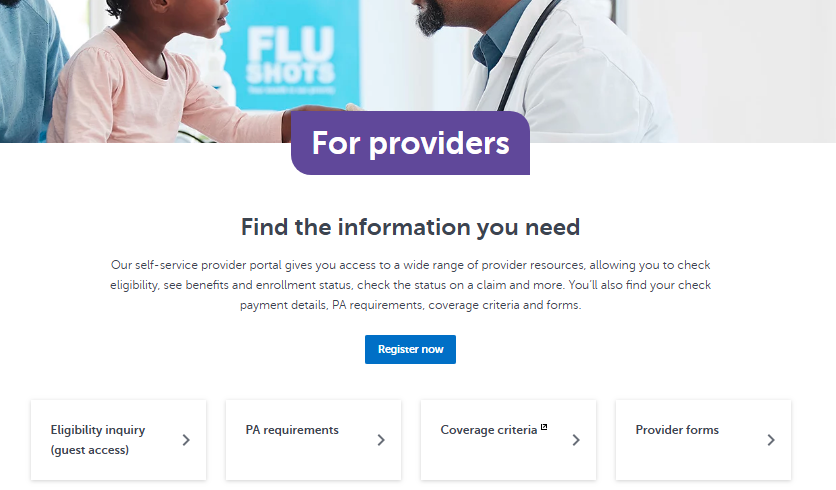
After the applicable requirements have been completed, the practice can create or access its HealthPartners provider portal account.
The portal supports activities such as managing practitioner and location data, checking member eligibility, reviewing remittance information, checking claims status, submitting appeals, and handling other administrative functions.
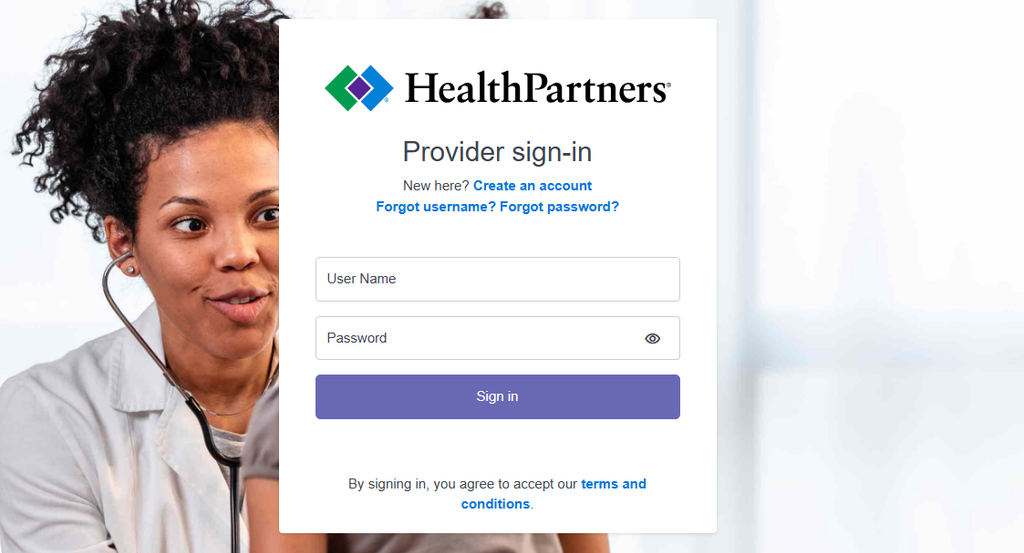
HealthPartners’ Provider Data Profiles application also allows contracted provider groups to add and update locations and practitioner information.
Step 9: Confirm Credentialing Approval and Active Status
Practitioners receive written notification once their application has been approved.
HealthPartners also provides tools to check the status of initial credentialing applications and verify whether practitioners are currently credentialed.
Importantly, submitting an application does not mean a practitioner can immediately begin seeing HealthPartners members. HealthPartners states that practitioners may not see HealthPartners members or appear in directories and member service resources until credentialing is complete and the application is approved.
How Long Does HealthPartners Provider Credentialing Take?
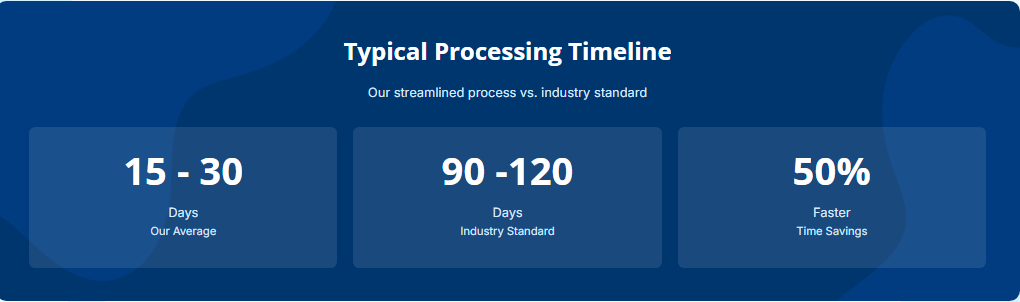
The HealthPartners provider credentialing timeline can vary from one application to another.
HealthPartners recommends that dental credentialing applications be submitted at least 90 days before the employment date, but this should not be interpreted as a universal processing time for all HealthPartners provider types.
HealthPartners Credentialing Services
Managing HealthPartners provider credentialing manually can become increasingly difficult as organizations add practitioners, locations, specialties, and payer relationships.
Credentialing teams may need to manage:
- Provider applications
- Credentialing documentation
- License information
- NPI information
- Malpractice documentation
- Payer enrollment
- Application status
- Follow-up requests
- Provider data changes
- Recredentialing
- Facility credentialing
- Multiple payer requirements
A centralized credentialing workflow can help practices organize these activities instead of relying entirely on spreadsheets, email threads, shared folders, and individual payer portals.
For larger organizations, the challenge is often not completing one application. It is maintaining visibility across dozens or hundreds of provider records and knowing which application, document, or credential requires attention next.
How MantraComply Can Help
MantraComply provides healthcare organizations with technology for provider credentialing, payer enrollment, CAQH management, primary source verification, recredentialing, and related administrative workflows.
Through its credentialing and enrollment platform, organizations can centralize provider and payer information and manage credentialing activities through a more structured workflow.
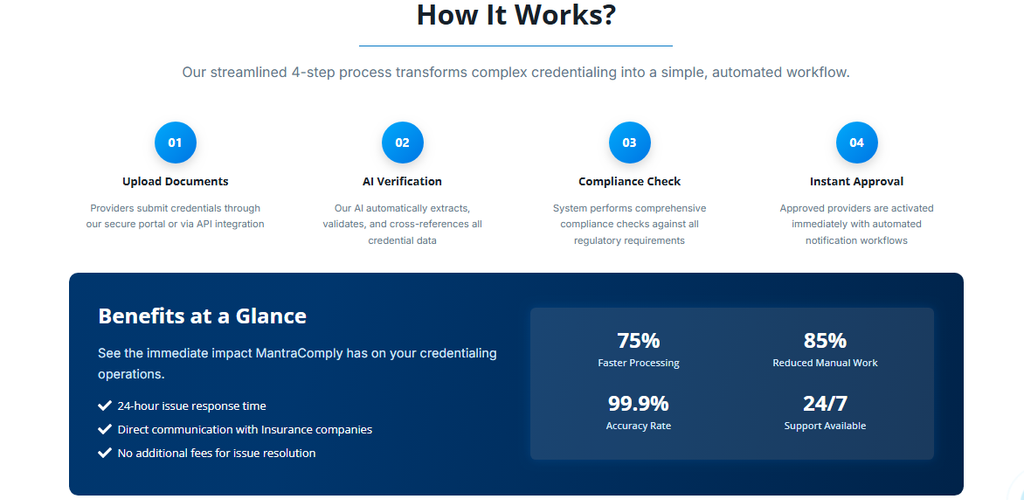
For practices handling HealthPartners provider credentialing alongside other payer applications, a centralized platform can help with:
- Provider credentialing management
- Payer enrollment
- Application tracking
- Document management
- Primary source verification
- CAQH management
- Recredentialing tracking
- Provider data management
- Issue resolution
- Credential expiration monitoring
This reduces repetitive administrative work and makes it easier to identify incomplete applications or upcoming requirements.
MantraComply can also support organizations that manage credentialing across multiple providers and payers, helping teams move away from disconnected spreadsheets and manual follow-up.
Conclusion
HealthPartners provider credentialing is a structured process that begins with network contracting and continues through credentialing or enrollment, documentation, additional business information, and final approval.
The most important distinction to understand is that contracting and credentialing are separate processes. HealthPartners requires providers to have a contract or contract offer before credentialing can begin.
Providers should also determine whether their practitioner type requires credentialing or enrollment, prepare the correct application and supporting documents, and maintain accurate provider information throughout the relationship.
Because credentialing is an ongoing administrative responsibility rather than a one-time form submission, practices can benefit from centralized workflows that help track applications, documentation, provider data, and recredentialing requirements.
For organizations managing multiple providers and payer relationships, automation can make HealthPartners provider enrollment and credentialing easier to monitor while reducing repetitive administrative work.
Frequently Asked Questions
There is no single published turnaround. Timing can vary based on application completeness and whether additional information is required. Providers should confirm current processing expectations directly with HealthPartners.
ApplySmart is a shared Minnesota credentialing platform accessed through Mncred.org. Minnesota-based medical clinics are required to use it for initial credentialing applications, and clinics outside Minnesota may use it as well. It is the standard entry point for the HealthPartners provider application for most medical practitioners.
Contracting establishes the provider network agreement and is managed by the Contracting and Payer Relations department. Credentialing is the separate review that verifies a practitioner’s qualifications. A contract, or an offer of one, must exist before HealthPartners will begin reviewing a credentialing application.
No. Practitioners cannot see HealthPartners members and will not appear in provider directories or member service resources until the credentialing process is complete and the application has been approved in writing. Seeing patients before that approval can create billing complications.
Providers can check credentialing status directly through the Provider Data Profiles application or the initial credentialing status tool on the HealthPartners website. For contracting-specific questions, providers can contact the Contracting and Payer Relations department directly.
View Sources
- HealthPartners. Provider Contracting and Credentialing . Accessed 10/3/2026.
- HealthPartners. Provider Credentialing and Enrollment . Accessed 10/3/2026.
- HealthPartners. Provider Credentialing . Accessed 10/3/2026.
- HealthPartners. Provider Medical and Dental Credentialing . Accessed 10/3/2026.
- HealthPartners. Start the Provider Contracting Process . Accessed 10/3/2026.
- MantraComply. Healthcare Credentialing Services . Accessed 10/3/2026.