Are you looking to complete Premera provider credentialing before joining the Premera network? Unlike many health plans, Premera’s published process requires providers to complete credentialing before requesting a contract.
Premera Blue Cross uses CAQH for electronic credentialing applications and works with Certify for credentialing verification and ongoing monitoring. Providers should confirm the requirements applicable to their specialty, provider type, and network before starting.
This guide covers Premera provider credentialing requirements, eligibility, required documents, the step-by-step credentialing process, timelines, contracting, and credentialing management.
What Is Premera Provider Credentialing?
Premera provider credentialing is the process of verifying a healthcare provider’s qualifications, professional background, and eligibility to participate in Premera Blue Cross’s provider network. It helps ensure that providers meet the health plan’s requirements before they can deliver covered services to members as in-network providers. The process may involve reviewing medical licenses, education and training, board certifications, work history, malpractice coverage, and other relevant professional information. The specific requirements depend on the provider’s specialty, professional status, and the type of network participation requested.
The process typically includes submitting a credentialing application, authorizing Premera to access the provider’s credentialing profile through CAQH, and completing the required verification checks. Once credentialing is approved, the provider must complete the applicable contracting requirements before participating in the network and billing under the agreement. Premera also requires recredentialing every three years to ensure providers continue to meet its standards. Keeping professional records, licenses, insurance documents, and practice information current can help prevent avoidable delays and interruptions in network participation.

Premera Provider Credentialing vs. Premera Provider Enrollment
Credentialing and enrollment support different parts of the provider onboarding process. Premera credentialing comes before contracting, while enrollment may involve establishing provider information with applicable payer or billing systems.
| Premera Provider Credentialing | Provider Enrollment |
|---|---|
| Verifies professional qualifications and credentials. | Establishes or updates provider information with applicable payer systems. |
| Reviews licenses, education, training, work history, and other credentials. | Supports payer participation and billing requirements. |
| Must be completed before Premera contracting. | May involve payer-specific enrollment requirements. |
| Uses CAQH and Certify in Premera’s current process. | May involve payer portals or other enrollment systems. |
Once credentialing is complete, the provider still needs a fully executed Premera contract with an effective date before being considered an in-network provider.
Organizations can use credentialing and provider enrollment services to coordinate these related workflows.
Who Is Eligible for Premera Provider Credentialing?
Premera credentialing applies to practitioners and providers who meet the applicable requirements for participation in the Premera network.
For Washington providers, Premera states that providers with an approved specialty can qualify for Premera contracts, while out-of-state contracts may be subject to additional limitations.
Depending on the provider and practice arrangement, credentialing may apply to:
- Physicians
- Other licensed healthcare practitioners
- Providers with an independent relationship with Premera
- Practitioners joining a contracted medical group or IPA
- Certain providers delivering services outside an exclusively inpatient facility setting
Premera also identifies certain hospital-based practitioners who may not require direct Premera credentialing when they practice exclusively within a facility setting. Providers should therefore confirm their specific credentialing requirements before applying.
Basic Requirements for Premera Provider Credentialing
Before beginning Premera provider credentialing, providers should confirm their specialty eligibility and prepare accurate professional information.
Common requirements include:
- Approved provider specialty
- Current state license
- CAQH profile
- Education and training information
- Recent work history
- Explanation of applicable employment gaps
- DEA certificate, when applicable
- Professional liability insurance
- Hospital privileges or an applicable admission plan
- Provider attestation and release
- Practice location and tax information
- Additional provider-specific documentation
Premera’s credentialing checklist specifically identifies items such as practice location information, an attested application, DEA documentation when applicable, professional liability coverage, hospital privileges or an admission plan, and an IRS SS-4 confirmation letter. Documents expiring within 90 days can delay an application.
Providers should also keep their CAQH information complete and current before authorizing Premera to access the profile.
Documents Required for Premera Provider Credentialing
The exact requirements can vary by provider type and situation. Premera’s current credentialing checklist identifies the following information and documents as part of the credentialing process.
| Document / Information | Why It Matters |
|---|---|
| Current State License | Verifies authorization to practice |
| CAQH Profile | Provides electronic credentialing information |
| Credentialing Application & Attestation | Supplies required provider information and declarations |
| Practice Location & Tax Information | Identifies where services are provided |
| DEA Certificate, If Applicable | Verifies controlled-substance prescribing authorization |
| Professional Liability Insurance | Confirms current malpractice coverage |
| Hospital Privileges or Admission Plan | Documents applicable hospital arrangements |
| Education & Training Information | Supports professional qualification verification |
| Five-Year Work History | Helps verify professional employment history |
| Explanation of Employment Gaps | Addresses gaps of more than six months where applicable |
| IRS SS-4 Confirmation Letter | Supports required tax identification information |
| Sponsoring Physician Information | Required for physician assistants where applicable |
Premera advises providers to submit complete and accurate information through CAQH and its credentialing intake process.
Step-by-Step Premera Provider Credentialing Process
The Premera provider credentialing and enrollment process involves several stages, from confirming specialty eligibility and completing CAQH requirements to receiving credentialing approval and finalising a provider contract. Healthcare professionals should complete each stage accurately and respond promptly to requests for additional information. Understanding the distinction between credentialing approval and contract activation is particularly important, as approval alone does not establish an active in-network relationship.

Step 1: Confirm Your Specialty Is Approved
Before beginning the credentialing application, verify that your provider type or specialty appears on Premera’s approved specialty list. Confirming eligibility at the outset helps you determine whether you can proceed with the application.
- Check Specialty Eligibility: Review Premera’s applicable specialty requirements to establish whether your provider category is eligible for participation.
- Contact Provider Relations: If your specialty is not listed, contact provider.relations@premera.com to clarify whether you can proceed.
- Confirm the Appropriate Route: Resolve any eligibility questions before investing time in preparing and submitting the credentialing application.
Step 2: Complete Your CAQH Profile
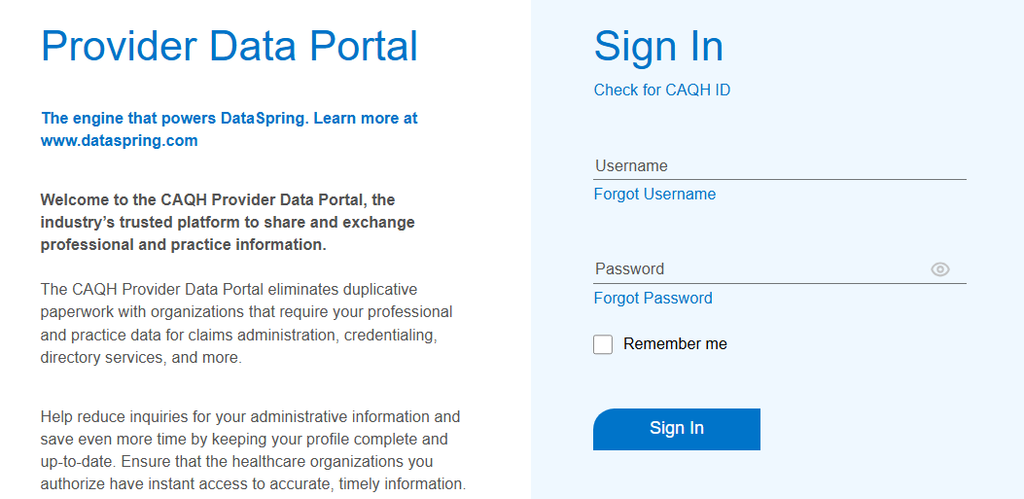
Premera uses information available through CAQH as part of its credentialing process. Providers should ensure their CAQH profiles are complete, accurate and currently attested before proceeding with the application.
- Review Provider Information: Check your personal details, professional qualifications, education, training, employment history, licences and other applicable credentials.
- Complete Attestation: Ensure your profile has been reviewed and attested as required, and address any outstanding sections.
- Verify Your Email Address: Include your main email address and ensure it remains accessible, as Certify uses it for application-related communications.
- Organise Supporting Information: Keep relevant credentialing documents and provider details organised to make it easier to address any subsequent requests.
Maintaining accurate CAQH information and provider data can help reduce repetitive administrative work and inconsistencies across credentialing records.
Step 3: Authorize Premera’s Access to Your CAQH Profile
Completing your CAQH profile is not the only requirement. You must also ensure that Premera has the appropriate authorisation to access the information needed to process your credentialing application.
- Open the Authorization Section: Sign in to CAQH and navigate to the relevant authorisation settings.
- Select Premera Blue Cross: Grant Premera access to your profile, or use the global authorisation option where appropriate.
- Verify Authorisation: Confirm that the applicable access permission is in place so Premera can retrieve the information required for its review.
Incomplete or incorrect authorisation may prevent the required CAQH information from being retrieved, potentially affecting the progress of your application.
Step 4: Submit Your Credentialing Application Through Certify
After completing the applicable CAQH requirements, submit the signed credentialing application through Premera’s Certify platform. Ensure that the information provided in the application is consistent with your CAQH profile and supporting documentation.
- Complete the Application: Provide the requested professional and practice information accurately, following the instructions in Certify.
- Review Before Submission: Check for missing information, inconsistencies and incomplete sections before submitting the application.
- Submit and Retain Confirmation: Complete the required submission steps and retain the acknowledgement or confirmation for your records.
- Monitor Application Status: Check Certify and your registered email address for updates, follow-up requests or instructions.
Certify may request additional information if details are missing or require clarification. Responding to these requests promptly can help prevent avoidable delays.
Step 5: Complete Background Checks and Credential Verification
Once the application has been submitted, Premera reviews and verifies the professional information required for credentialing. This stage helps determine whether the applicant meets the applicable credentialing standards.
- Verify Education and Training: Premera reviews relevant education, professional training and other qualifications.
- Review Licensure and Professional Credentials: Applicable licences and credentials are checked as part of the verification process.
- Assess Professional History: Employment history, malpractice history and other relevant information may be reviewed.
- Resolve Discrepancies: Be prepared to clarify inconsistencies or provide supporting documents if requested during verification.
The information supplied should be accurate and consistent across the application, CAQH profile and supporting records. Any additional verification requirements will depend on the applicable credentialing criteria.
Step 6: Respond to Additional Information Requests
During the credentialing review, Premera may identify missing information or require further clarification. Providers should monitor communications and respond through the appropriate channel to keep their applications moving.
- Check Certify Regularly: Review application updates and outstanding requirements.
- Monitor Your Email: Check the email address associated with CAQH for communications from Certify.
- Provide Complete Responses: Submit the requested information and supporting documentation in the format specified.
- Track Outstanding Items: Maintain a record of submitted documents, pending requests and responses to help avoid missed requirements.
Premera’s process directs providers to Certify for application follow-ups. Providers should use the designated channel and follow the instructions provided for each request.
Step 7: Undergo Credentialing Committee Review
After the required verification activities are completed, the provider’s file proceeds through the applicable credentialing review. Premera states that credentialing decisions are made by a Credentialing Committee, which evaluates practitioner and provider files against its applicable standards.
- Complete Verification First: Ensure the required information and verification activities have been addressed.
- Undergo Committee Review: The Credentialing Committee reviews the file against applicable credentialing criteria.
- Await the Decision: Respond to any outstanding requests and wait for written notification of the outcome.
Submitting an application does not guarantee approval. The outcome depends on the applicable credentialing standards and the committee’s review of the provider’s file.
Step 8: Receive Credentialing Approval
Once the credentialing review is complete, Premera provides written notification of its decision. Providers who receive approval can proceed to the next stage, which involves arranging the applicable network contract.
- Review the Decision: Read the written notification carefully and retain it for your records.
- Look for the Welcome Letter: Approved providers receive a credentialing welcome letter before moving into the contracting stage.
- Prepare for Contracting: Review any instructions provided for requesting an individual provider agreement or arranging participation through a contracted IPA or medical group.
Credentialing approval confirms the outcome of the credentialing review; it does not, by itself, mean that the provider has an active network contract.
Step 9: Request a Premera Provider Contract
After credentialing approval, the provider can request an individual provider contract or pursue participation through a contracted Independent Practice Association (IPA) or medical group, as applicable.
- Choose the Appropriate Contracting Route: Determine whether you will seek an individual agreement or participate through an eligible contracted IPA or medical group.
- Submit the Contract Request: Follow Premera’s instructions for initiating the applicable contracting process.
- Coordinate Group Participation: For providers joining a new group, each provider must complete individual credentialing before the group can request a contract.
- Confirm Next Steps: Follow any instructions provided by Premera’s contracting team regarding the agreement and remaining requirements.
The appropriate route depends on the provider’s circumstances and the contracting arrangement being pursued.
Step 10: Complete Contract Execution
Once the contracting process begins, Premera’s contracting team prepares and sends the applicable provider agreement for signature. Providers should review the agreement carefully before completing the execution process.
- Review the Agreement: Check the contract details, applicable terms and information relating to the provider or practice.
- Sign and Return the Contract: Complete the required signature process and provide any outstanding information requested by the contracting team.
- Await Full Execution: Ensure the agreement has been fully executed by the relevant parties.
- Retain the Final Agreement: Keep a copy of the completed contract for administrative and compliance records.
A provider is not considered contracted until the agreement is fully executed. Credentialing approval alone does not establish an active contractual relationship with Premera.
Step 11: Confirm the Contract Effective Date
After the agreement has been fully executed, providers should confirm the effective date of their network participation. This is an important distinction because credentialing approval and contract activation are separate milestones.
- Obtain Written Confirmation: Retain the finalised agreement and confirmation of the applicable effective date.
- Verify Network Status: Ensure the contractual arrangement is active before treating Premera members as an in-network provider under that agreement.
- Follow Applicable Billing Requirements: Confirm the relevant contractual and claims procedures before submitting claims under the network arrangement.
- Maintain Contract Records: Keep the executed agreement and effective-date information accessible for future reference.
Providers should not assume that approval means they can immediately operate as an in-network provider. The applicable contract must be fully executed, and its effective date must be confirmed.
Step 12: Maintain Credentialing and Provider Information
Provider responsibilities continue after credentialing approval and contract activation. Keeping professional credentials and administrative information current helps support ongoing participation and compliance with applicable requirements.
- Complete Recredentialing: Premera recredentials established practitioners and providers every three years, according to the stated cycle.
- Verify Directory Information: Provider directory information must be verified every 90 days under applicable federal No Surprises Act requirements.
- Update Provider Records: Keep relevant professional credentials, practice details, contact information and other provider information accurate.
- Respond to Renewal Requests: Monitor communications about recredentialing, directory verification and any additional documentation requirements.
- Maintain Supporting Documents: Keep relevant credentialing and contracting records organised and accessible for future reviews.
Regularly reviewing provider information can help identify outdated details and reduce administrative issues during recredentialing, directory verification or contract maintenance.
Important: Credentialing approval, contract execution and the effective date are distinct stages of the Premera enrollment process. Providers should wait for confirmation of the fully executed agreement and its effective date before treating the network relationship as active.
How Long Does Premera Provider Credentialing Take?
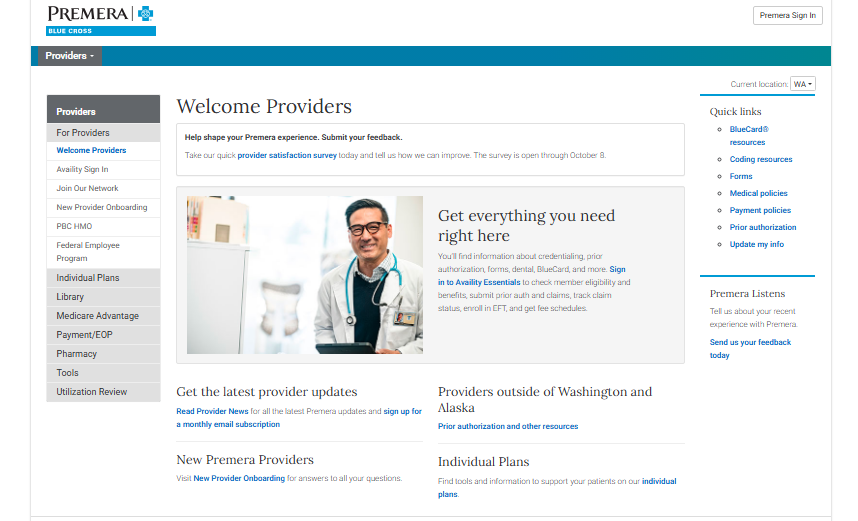
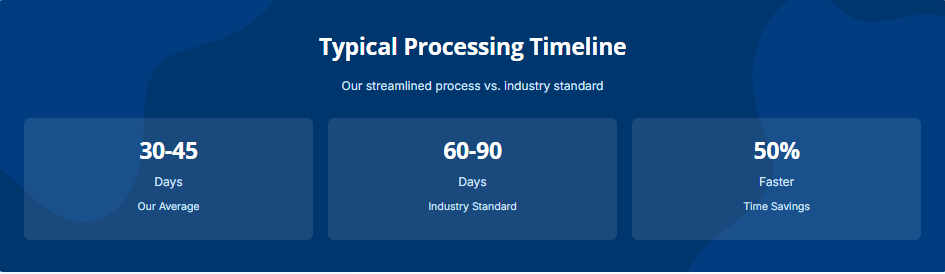
Premera states that most providers complete credentialing within 60 days or less. Processing times may vary depending on application completeness, verification requirements and responses to additional requests. Maintaining an accurate CAQH profile and responding promptly through Certify can help avoid unnecessary delays.
However, credentialing approval does not mean immediate network participation. Contracting begins after credentialing is complete, and providers must receive a fully executed agreement with a confirmed effective date before operating as in-network providers.
Premera Provider Credentialing Services
Premera provider credentialing involves reviewing professional qualifications, verifying credentials, evaluating applications and issuing decisions before contracting. Healthcare organisations managing multiple providers can benefit from structured support to keep documentation accurate and workflows organised.
MantraComply helps streamline credentialing administration by organising CAQH profiles, maintaining supporting documents and tracking application progress through Certify. This structured approach helps teams monitor outstanding requirements, coordinate follow-ups and manage contracting milestones more efficiently.
Ongoing support with recredentialing deadlines, provider information updates and directory verification can also help organisations maintain accurate records and manage recurring administrative responsibilities.
How MantraComply Can Help With Premera Credentialing
Managing Premera provider credentialing and enrollment manually can involve repeated documentation, follow-ups, and status tracking. A credentialing and enrollment platform helps centralize these workflows.
- CAQH Management: Keep provider information organized and current.
- Document Management: Centralize licenses, insurance, certifications, and supporting documents.
- Application Preparation: Organize information required for payer applications.
- Application Tracking: Monitor credentialing and enrollment progress.
- Expiration Monitoring: Track expiring provider credentials and documents.
- Enrollment Management: Coordinate credentialing with applicable payer enrollment workflows.
With an AI-driven credentialing and enrollment solution, organizations can combine software, credentialing specialists, application support, compliance checks, and real-time workflow visibility in one platform.
Conclusion
Premera provider credentialing follows a specific sequence: credentialing first, contracting second. Providers should confirm specialty eligibility, maintain an accurate CAQH profile, authorize Premera’s access, and complete the Certify application before moving to contracting.
Credentialing approval does not automatically make a provider in-network. The provider must receive a fully executed contract and effective date before treating Premera members under the applicable network agreement.
For organizations managing multiple providers, MantraComply can help centralize credentialing, provider data, documents, application tracking, enrollment, and ongoing compliance workflows.
Frequently Asked Questions
Premera’s published process places credentialing before contracting, allowing the plan to complete its credentialing review before the provider moves to the contracting stage. This differs from some health plans that contract first, and it means a Premera Blue Cross provider application cannot move toward a signed contract until credentialing is fully approved.
Certify is an NCQA-certified credentialing verification organization that Premera works with to verify credentialing applications and provide ongoing monitoring. Certify may contact providers directly to request additional information, and providers log in to Certify to submit their signed credentialing application as part of the overall process.
Premera’s published materials indicate that established practitioners and providers are recredentialed every three years. Separately, providers and facilities must also verify directory data every 90 days under the federal No Surprises Act, which is a distinct requirement from the three-year recredentialing cycle.
Not automatically. Credentialing completion and contract activation are two separate dates. Providers should wait until they are notified of a fully executed contract and its effective date before treating patients as in-network or submitting claims to Premera.
Providers whose specialty is not listed should email provider.relations@premera.com to discuss their situation before submitting a Premera Blue Cross provider application. Starting the CAQH and Certify process without confirming specialty eligibility first can lead to unnecessary delays.
View Sources
- MantraComply. Premera Provider Credentialing. Accessed 20/10/2026.
- Premera Blue Cross. Join Our Network. Accessed 20/10/2026.
- Premera Blue Cross. Credentialing and Contracting. Accessed 20/10/2026.
- Premera Provider News. Credentialing Changes Effective March 1. Accessed 20/10/2026.